
Songbook and set lists for working musicians
Your songbook, perfectly organized.
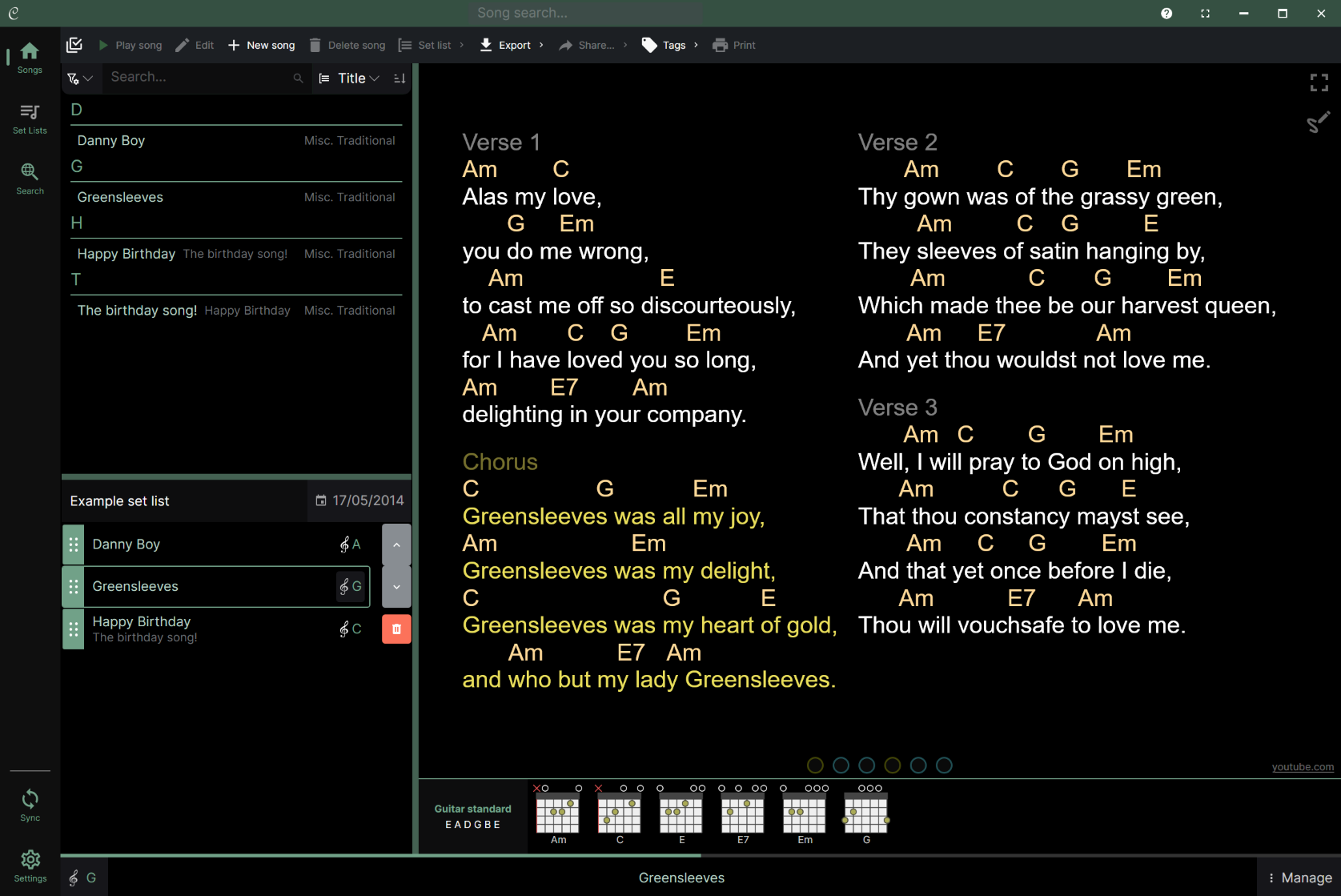
Chordle keeps lyrics, chords, tab and chord grids ready on phone, tablet, laptop and desktop. Transpose in one tap, scribble ink notes, stay in time, and keep every device in step with Chordle Drive, OneDrive or Google Drive. Give your band one shared library with Groups.
- Free to start
- Windows + Android
- Light and dark themes
- Works offline
Top rated on the Microsoft Store - Export ChordPro, Word and PDF any time, no lock-in


★★★★☆ 4.4 out of 5 from 343 Microsoft Store ratings, with 69% five stars - read the reviews
New in Chordle
Real tab. Real chord grids. Your own instruments.
Most chord apps show tab as a wall of dashes in a fixed font. Chordle draws it as a proper staff, lays out chord grids bar by bar, and makes diagrams for whatever you play.
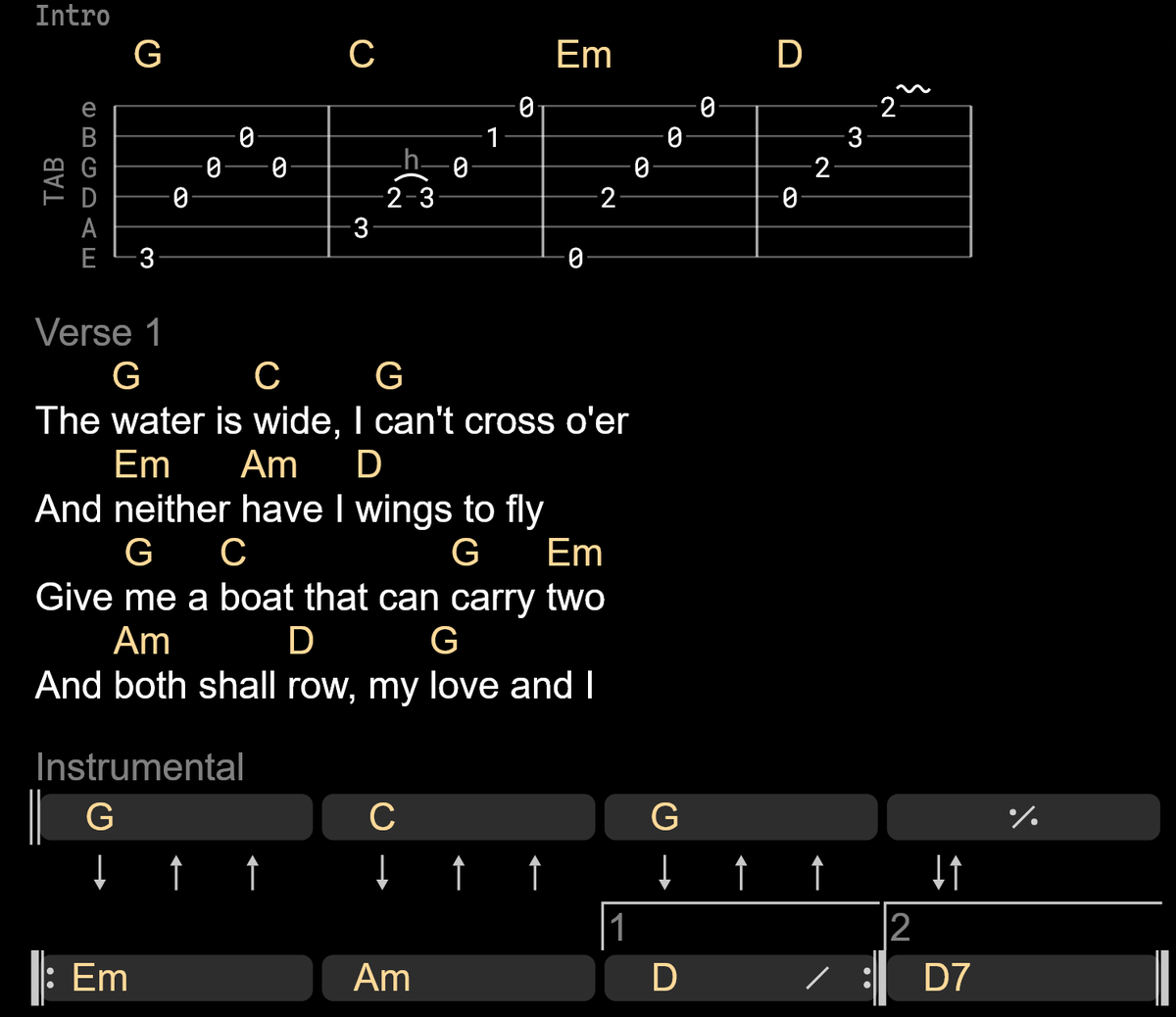
Tablature, drawn properly
Paste tab as you always have and Chordle draws a real tab staff. Hammer-ons, pull-offs, slides, bends and vibrato read at a glance, in any tuning, with chord names above the notes.
Chord grids
Bar by bar grids for intros, solos and progressions, with repeats, endings and strum patterns. Choose flat or block style, and the chords transpose with the rest of the song.
Your own instruments
From 3 to 12 strings, tuned however you like: DADGAD, open G, baritone, seven string. Chord diagrams work just like the built-in instruments, and follow your songs to every device.
Grids and tab export to Word as pictures that match the screen, in the key you export. See everything that's new.
How it works
From scattered files to one tidy songbook.
Three steps most players finish in a single evening: build the library, shape each song, play the set list.
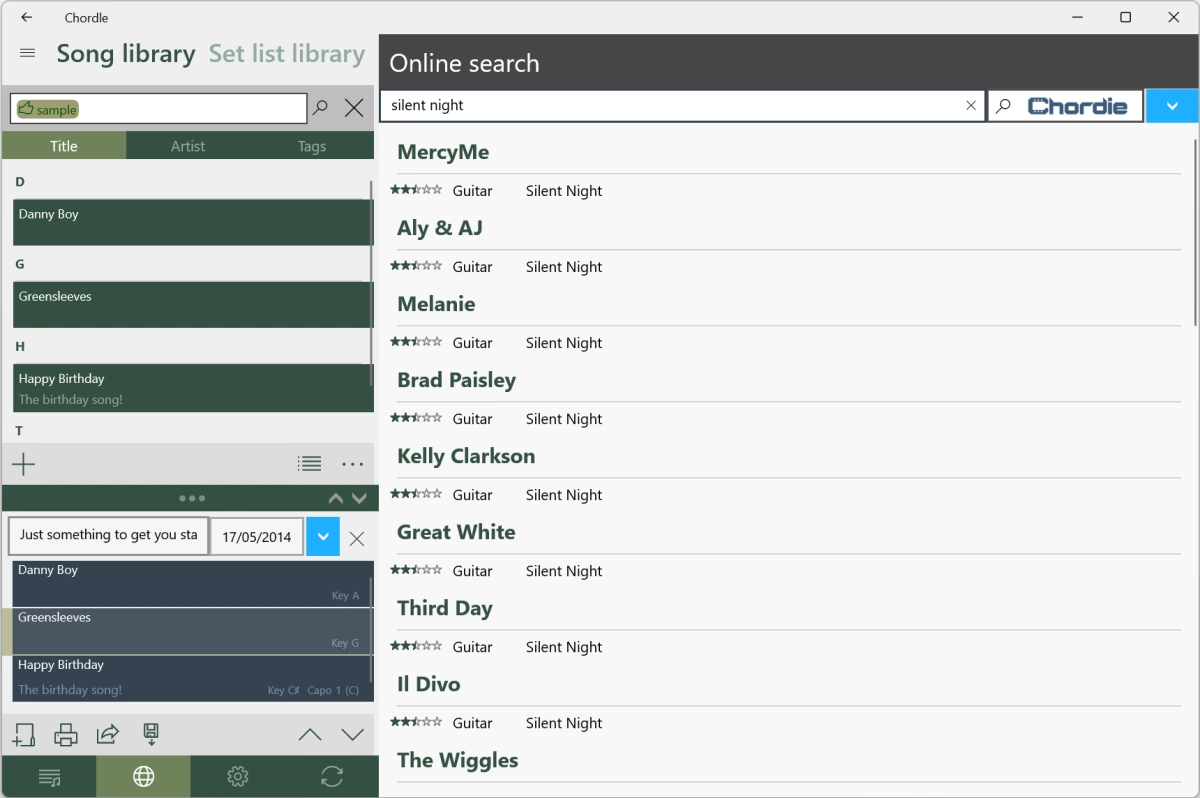
1. Build fast with online song search
The simplest way to build your library is to search online inside the app and save songs straight to it. ChordPro and Word files open directly too, and tags keep the right version one search away.
- Online search across supported sites, saved to your library
- ChordPro and Word files open directly in the app
- Tags, alternative titles and per-song keys
2. Shape it for your hands
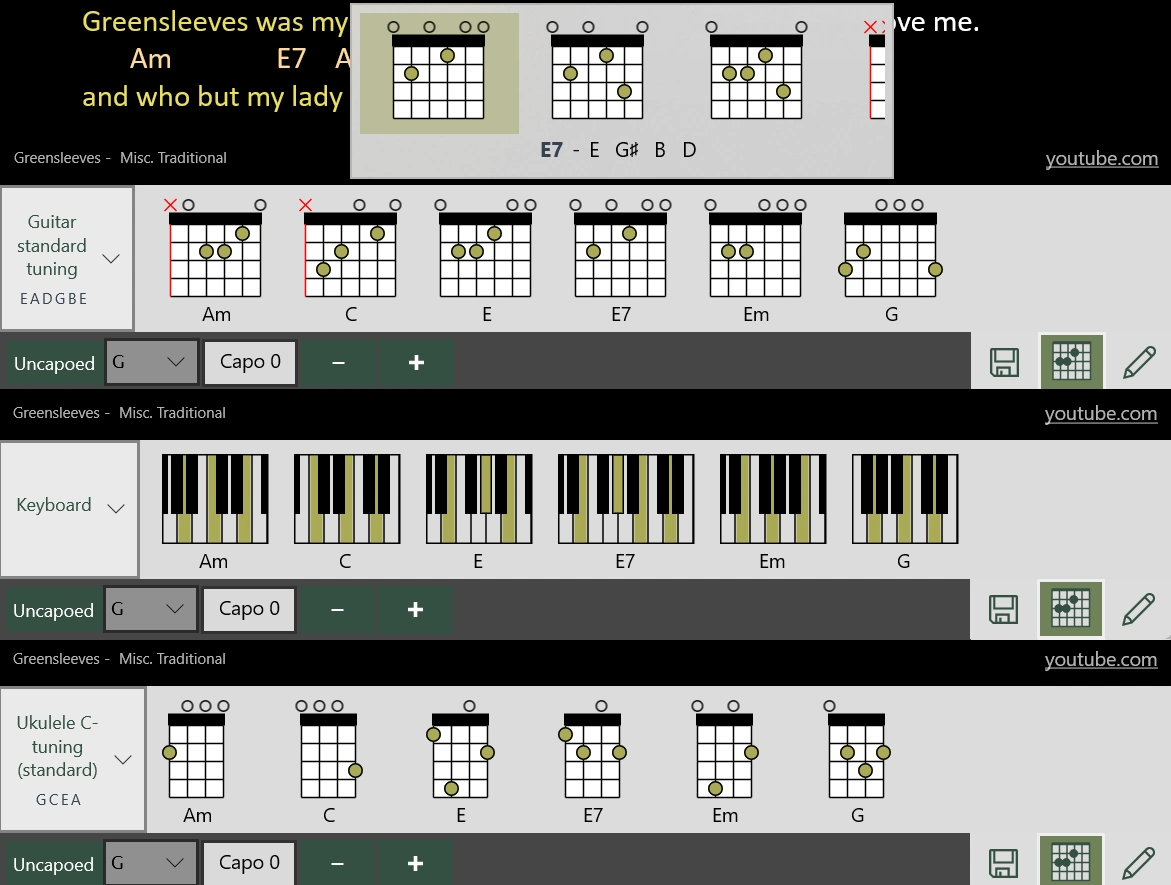
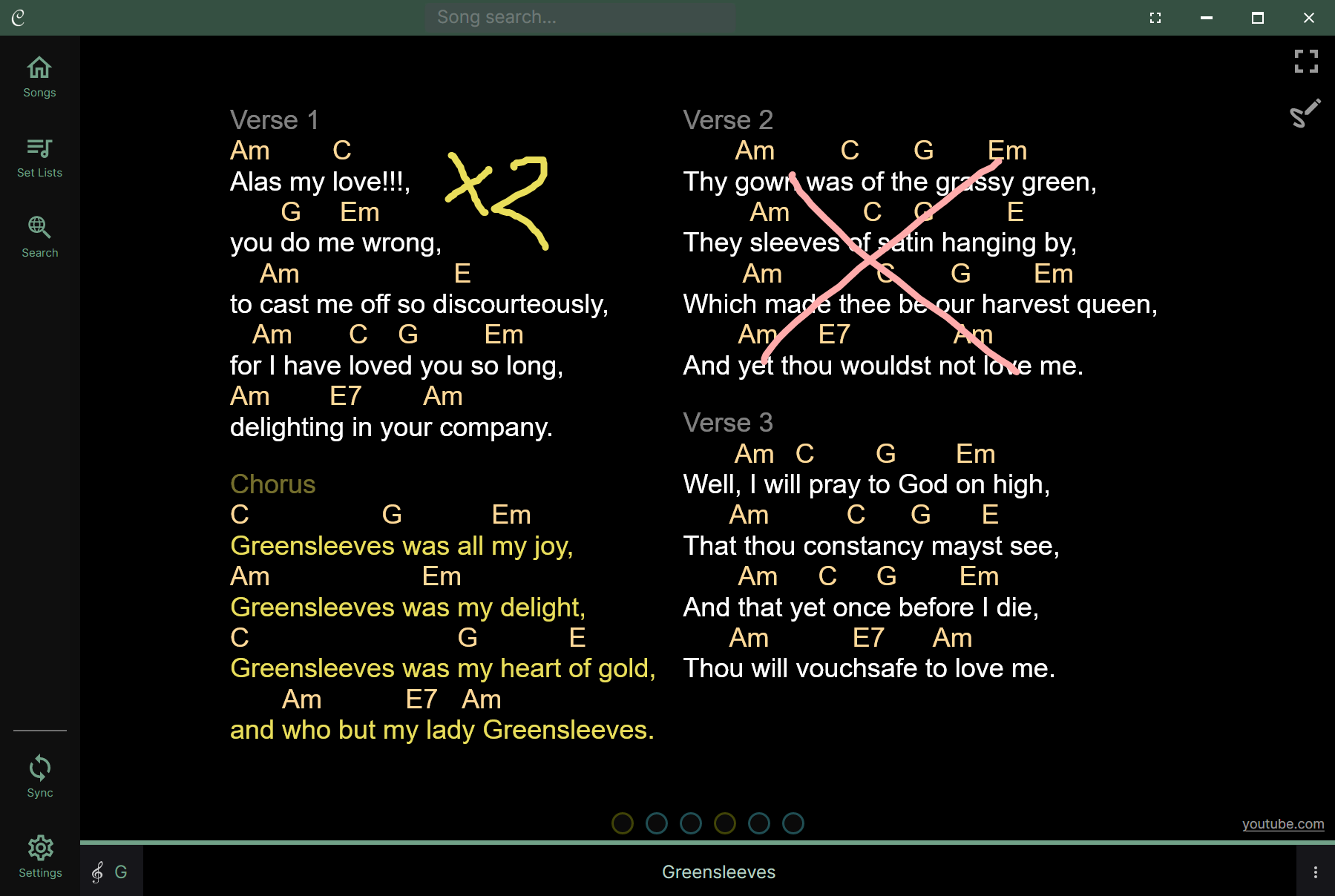
Transpose to the singer's key, set a capo, pick friendlier chord shapes, and mark it up like paper. Diagrams are generated for guitar, mandolin, ukulele and keyboard, or for instruments you create with your own tuning, and you can pin your preferred voicing per song.
- Transpose and capo, with a different key per set list
- Capoed view for guitar, concert pitch for keys
- Your own instruments and tunings, from 3 to 12 strings
- Ink annotations that survive zoom and relayout
3. Play it without surprises
Fit a song to one screen, scroll it, or page it. Keep time with the visual and audio metronome, push lyrics to an external monitor, and drive it all from keys or a foot pedal.
- Single screen, scrolling and paginated modes
- Metronome with tempo memory per song
- External monitor lyrics for audience or band
Features
Everything you need on stage. Nothing you do not.
Twelve tools that cover the library, the rehearsal room and the stage.
Chord Transposition
Move to a new key or capo in one tap. Keep a different key per set list, and show capoed or concert pitch per player.
Visual & Audio Metronome
Set a song’s tempo and time signature, then keep time with a visual metronome, an audible beat, or both at once.
Chord Diagrams New
Auto diagrams for guitar, mandolin, ukulele and keyboard, or create your own instruments with any tuning. Save your favourite shape per song.
Tablature New
Tab drawn as a real staff, with hammer-ons, slides and bends you can read at a glance. Works in any tuning.
Chord Grids New
Bar by bar chord grids with repeats, endings and strum patterns, in flat or block style. They transpose with the song.
Works for bands
Give the band one shared library with Groups. Guitar sees capoed chords while keys see concert pitch. Alternative titles for church repertoires.
Online song search
Find songs on supported sites without leaving the app and grow the library in minutes.
Filter by key and capo New
Find every song that sounds in a key, or every song you play with the same shapes and capo, to build smooth sets.
Highly customizable
Light and dark themes, Standard, German, Latin and Nashville notation, custom song themes, three presentation modes.
Cloud Sync
Sync your songs and set lists across all your devices with Chordle Drive, or your own OneDrive or Google Drive, so your library is always with you.
Ink Annotations
Handwritten notes and drawings with pen colours and thickness, saved to songs or set lists.
External Monitor
Present lyrics on a second screen for your audience or band, mirroring your display or showing lyrics only.
Switch and import
Bring your library. Leave the binder.
Three ways in, no binder required. Search online inside the app, open your existing files directly, or paste anything else and tidy it in the editor.
- Online search across supported sites - new songs land straight in your library
- Registered for ChordPro and Word files - double-click to open them in Chordle
- Paste anything else - chords realign, tags and per-song keys kept intact
Full walkthroughs live in Importing, Exporting and Editing songs.
Reviews
Rated 5 stars by players who gig.
★★★★★
“Update - still the best, 6 years later! [...] This is still an indispensable tool for me as a working musician. And it's getting BETTER. Developer is super responsive, cares about his product, and it shows. [...] I encourage all the OG chordle fam (Chordlers?) to subscribe & support the development of this amazing app!”
Bryan - Microsoft Store, July 2026
★★★★★
“Our church uses onsong for our main service - I didn't want to get another ipad for our youth group so I tried this out and to be honest I prefer it over onsong. It's intuitive and works great. [...] price wise this takes the cake.”
Allen - Microsoft Store, Aug 2026
★★★★★
“I have been a fan for years [...] They reached out and asked me to be in the Beta testing. After listening to EVERY piece of feedback, they really took something that I was a fan of and turned it into something I am fanatical about.”
Christopher - Microsoft Store, May 2026
Verbatim excerpts from Microsoft Store reviews. [...] marks where text is cut for length. Full reviews are on the store listing.
Pricing
Free to start. One account for every device.
Play free with up to 10 songs. Chordle Plus gives you unlimited songs on Windows and Android, plus Chordle Drive, on one subscription. Groups give your whole band one shared library.
Free
$0
Up to 10 songs, every player feature, works offline on stage.
Chordle Plus
$29.99 / year
or $3.99 / month. Windows and Android on one subscription, with Chordle Drive.
Groups
$35 / month for 10 seats
One shared library for your band, choir or church team. Free for 30 days.
FAQ
Quick answers.
Does Chordle work offline on stage?
How do I get songs into Chordle?
Can I use a different key or capo per set list?
Where do I learn more?
Get Chordle
Take your songbook to the stage tonight.
Download free and build your first set list. Upgrade only when your library grows.
Free to start - No card needed - Export any time