
Importing/exporting
Can I import a song from a PDF?
Not directly. PDFs are a special kind of file and don’t translate well into “raw unformatted text” that Chordle can import. The best thing to try is to highlight the text in a PDF viewer, copy it, and paste it into a new song in Chordle. If the text ends up mangled, then the PDF has been produced in such a way as to deliberately prevent converting it into another format.
Song presentation
How can I browse my song library while playing a song?
On a wide enough window the song player appears alongside your song library, so you can keep browsing and searching while a song plays - there’s nothing to open. If you’re in full screen, tap the reveal button in the top left of the player to bring the library back without leaving full screen.
If you also know which song you want to play, you can use the quick search feature to quickly find and play it.
When I paste text into a song, the chords don’t line up
Text copied from Word is usually spaced using a proportional font, so the chords lose their alignment when they land in Chordle’s editor. Use the Paste and realign chords option on the editor’s Paste button to rebuild the spacing so the chords sit over the correct words again. See pasting chords from Word and other sources.
Why do my songs contain hyphens?
When chords are positioned closer together above lyrics than there is available space in the lyrics themselves, Chordle sometimes needs to break words apart to make room. By default it inserts a connecting line (hyphen) across the gap to make it clear the split text is still one word - this is the Hyphenate mode.
If you’d prefer Chordle to leave your lyrics untouched and instead shift the chords rightward to avoid overlapping, you can switch to Move chords mode in the song presentation settings. See chord overlap mode for details.
Song keys
When I change the capo position for a song, the song keys are not changing
Chordle can be configured to display songs with or without capo transposition. Make sure your settings are set to display capoed chords.
When I change the key of a song, the chords don’t look like they’re in the right key
Make sure that you have the correct written notation kind set in the song by editing it. If the key is incorrectly set there, you can easily correct it by changing the key there and then saving the song.
Chordle infers the correct key when a song is pasted in, so you could also cut and re-paste the song text to have Chordle re-infer the key and notation kind.
Your Chordle account
What is a Chordle account?
A Chordle account is how you own a Chordle subscription and use it on every device. There’s no new password: you create it by signing in with a Google or Microsoft account at subscriptions.chordle.com. It’s free to create, with no card needed.
Your Chordle account holds:
- your Chordle Personal subscription, if you buy one
- the groups you run or belong to
- your Chordle Drive library and the devices that sync it
You only need an account for Chordle Personal, Chordle Drive and groups. The free plan and store licenses work without one.
Which Google or Microsoft account should I sign in with?
Any one you like, but always use the same one. Your account is tied to the exact sign-in you used to create it, so signing in with a different Google account, or with Microsoft instead of Google, gives you a separate, empty Chordle account.
After buying or joining a group on the website, tap Open Chordle on the page you land on. It signs the app in with the account you just used, so you don’t have to pick it again. If you sign in from the app yourself, go to Settings > License > Sign in and choose the same provider and email.
Is my Chordle account linked to my Microsoft Store or Google Play account?
No. Store accounts are separate and are not linked to a Chordle account. A store license stays with the store account that bought it, and a Chordle subscription stays with the Google or Microsoft sign-in you used on the website. Using the same email for both doesn’t connect them.
Can I change the sign-in on my account?
Not yourself yet. If you need to move your subscription to a different Google or Microsoft sign-in, contact us and we’ll help.
How do I download or delete my data?
Sign in to your Chordle account and open Profile. Download my data gives you everything we hold about your account as a file. Delete my account shows what will be removed and closes your account straight away. Any Chordle Personal or group subscription you pay for is cancelled first, so you won’t be charged again. If it can’t be cancelled, nothing is deleted. Payment records are kept for tax, without your name or email.
If you’re the only admin of a group other people are still in, make someone else an admin first. If you pay for a group that other admins are in, its subscription is cancelled too, and one of them needs to restart billing on the group’s billing page before the paid period ends. A Microsoft Store or Google Play subscription is managed by the store, so cancel it there.
Licensing
How are licenses managed?
There are two ways to unlock Chordle:
- Chordle Personal Subscription is bought on chordle.com and belongs to your Chordle account (the Google or Microsoft sign-in you use to buy it). Sign in with the same account in the app on any Windows or Android device and it’s unlocked there too, with Chordle Drive included.
- Store licenses are bought inside the app through the Microsoft Store on Windows or Google Play on Android. They are managed by that store (we don’t have access to purchase details) and unlock Chordle on that platform only.
How do store licenses compare with Chordle Personal Subscription?
| Store license | Chordle Personal | |
|---|---|---|
| Unlimited songs and set lists | Yes | Yes |
| Platforms | The store’s platform only (Windows or Android) | Windows and Android on one account |
| Sync | Your own OneDrive or Google Drive | Chordle Drive, plus OneDrive or Google Drive |
| Where you buy and manage it | Microsoft Store or Google Play | chordle.com |
If you already have a store license it keeps working on that platform. See pricing for current prices.
How do I move from a store license to Chordle Personal Subscription?
- Buy Chordle Personal on chordle.com, signing in with Google or Microsoft. If you have a store license, the app’s Settings > License page also has a card to get you there.
- Tap Open Chordle after you’ve paid to sign the app in with the same account.
- Cancel your store subscription yourself. Buying Chordle Personal doesn’t cancel it, and you’ll be billed by both until you do. Cancel it in your Microsoft account or in Google Play subscriptions.
Your songs and set lists stay where they are. Turn on Chordle Drive to keep them in step across your devices.
Is there a limit on how many songs I can have?
There’s no limit on the number of songs and set lists you can add. What you can store is limited by:
- Your device’s storage. Your library is kept on each device so it works offline on stage. A typical song takes a few KB, so even a very large library fits easily.
- Your cloud storage limit. Chordle Drive, OneDrive and Google Drive each have a storage limit, though songs take up very little of it. If you reach the limit on Chordle Drive, contact us.
Can I install Chordle on multiple devices?
Yes. With a Chordle account, the app can be signed in on up to 10 devices with Chordle Personal, or 5 devices as a group member without it. Each device you sign in on counts once, however often you use it. If you reach the limit, open Devices in your Chordle account and Remove one you no longer use.
With a store license, it’s subject to that store’s policies:
- Windows (Microsoft Store): subject to the 10 device limit enforced by the Microsoft Store. As long as you sign into the Microsoft Store on all your Windows devices with the same account you used to make the initial purchase, then the license will automatically be applied.
- Android (Google Play): sign into Google Play on all your Android devices with the same Google account you used to make the purchase, and the subscription will be available subject to Google Play’s policies.
If I bought Chordle on Windows, do I get the Android version as well?
Not with a store license: a Microsoft Store license doesn’t unlock the Android app, and a Google Play license doesn’t unlock Windows. If you use both platforms, Chordle Personal covers Windows and Android with one subscription and keeps your library in step with Chordle Drive.
Can I try out syncing/adding more songs without paying for Chordle?
No. The free plan includes up to 10 songs. Unlimited songs and syncing need Chordle Personal or a store license.
What happens if I stop paying for the subscription?
If you stop paying for the subscription, your library will only show the first 10 songs in your song library, and set lists that don’t contain those songs will also be hidden. You can still play those songs and set lists, but you won’t be able to see or play any songs beyond the first 10 in your library. If you resubscribe, your full library will be available again.
Chordle Drive
What is Chordle Drive?
Chordle Drive is Chordle’s own sync service, included with Chordle Personal. It backs up your songs and set lists and keeps every device you sign in on up to date, much faster than OneDrive or Google Drive. See setting up Chordle Drive.
Can I keep using OneDrive or Google Drive?
Yes. You can sync with Chordle Drive, OneDrive and Google Drive at the same time, for example to keep a second copy of your songs somewhere else. See syncing with the cloud.
Do group members get Chordle Drive?
A group gives every member the group’s shared library and unlimited songs. A member’s own personal library syncs with Chordle Drive only if they also have Chordle Personal; otherwise they can keep using OneDrive or Google Drive for it.
Groups
What is a Chordle group?
A group gives your band, choir or church team one shared library, named after your group, that syncs to every member’s devices. An admin pays for the group, and every member gets unlimited songs without buying anything themselves. Members keep their own personal library separately: joining a group never mixes your own songs in with the group’s.
See running a group and joining a group.
How do seats work?
Each person in the group takes one seat, admins included. A pending invite holds a seat until it’s accepted, cancelled or expires. Admins choose the number of seats and can change it any time from Billing & seats. The price per seat goes down as the group grows: drag the slider on the pricing page to see what your group would pay.
What can members, editors and admins do?
- Members can view and play the group’s songs and set lists.
- Editors can also add and change songs.
- Admins also manage members, invites and billing.
A group can have more than one admin, so billing can still be sorted out if one of them leaves.
How does the group free trial work?
New groups are free for 30 days, with no card needed to start. Invite people, build the library and try it at rehearsal. Before the trial ends, an admin chooses Set up billing on the group to keep it going. The group’s page shows how many days are left.
Do I need a Chordle account to join a group?
Yes, but it only takes a moment. When you open your invite or join link you sign in with Google or Microsoft, which creates the account if you don’t have one. It doesn’t have to be the email address the invite was sent to.
How do I leave a group?
Ask one of the group’s admins to remove you from Members. You stop getting the group’s songs, the copies already on your devices stay as your own, and your personal library isn’t affected.
What happens if a group’s subscription ends?
The group’s songs and set lists are removed from members’ devices, and anyone without Chordle Personal or a store license goes back to the free plan. Members’ own songs aren’t touched.
The group’s library is kept for two months. If an admin restarts billing on the group’s Billing & seats page in that time, Chordle offers the group’s library again on members’ devices, and the songs come back when they sync it.
How do I delete a group?
Any admin can delete a group from the bottom of its Billing & seats page by typing delete to confirm. Everyone is removed from the group and its songs and set lists leave their devices, so make sure that’s what you want: it can’t be undone. If the group has a subscription, it’s cancelled first and no more payments are taken.
Billing, cancelling and refunds
What currency am I charged in?
Prices are in US dollars and include any sales tax or VAT that applies, so the price you see is the price you pay. Payments are handled by our payment provider, Lemon Squeezy, so your statement may show their name. Chordle never sees or stores your card.
Where do I find receipts or update my card?
Sign in to your Chordle account and open Plan and billing (or, for a group, Billing & seats). Manage billing opens the payment provider’s secure portal, where you can update your card and download receipts. Receipts are also emailed to you after each payment.
How do I cancel?
Open Manage billing as above and cancel there. Cancelling stops the next payment, and you keep everything until the end of the period you’ve paid for. For a group, any admin can cancel.
Store licenses are cancelled in the store instead: your Microsoft account or Google Play.
Can I get a refund?
Yes, within 14 days of any payment for Chordle Personal or a group. Email info@chordle.com from the address on your Chordle account, tell us which payment, and we’ll refund it in full.
Refunds for store licenses are handled by the store: see issues with purchases.
What happens if a payment fails?
Nothing stops straight away. Your account shows the date you need to update your card by, a week after the payment was due. Update it from Manage billing and everything carries on. If that date passes without a payment, the subscription ends and Chordle goes back to the free plan, as described above.
Updates
Checking for updates on Windows (Microsoft Store)
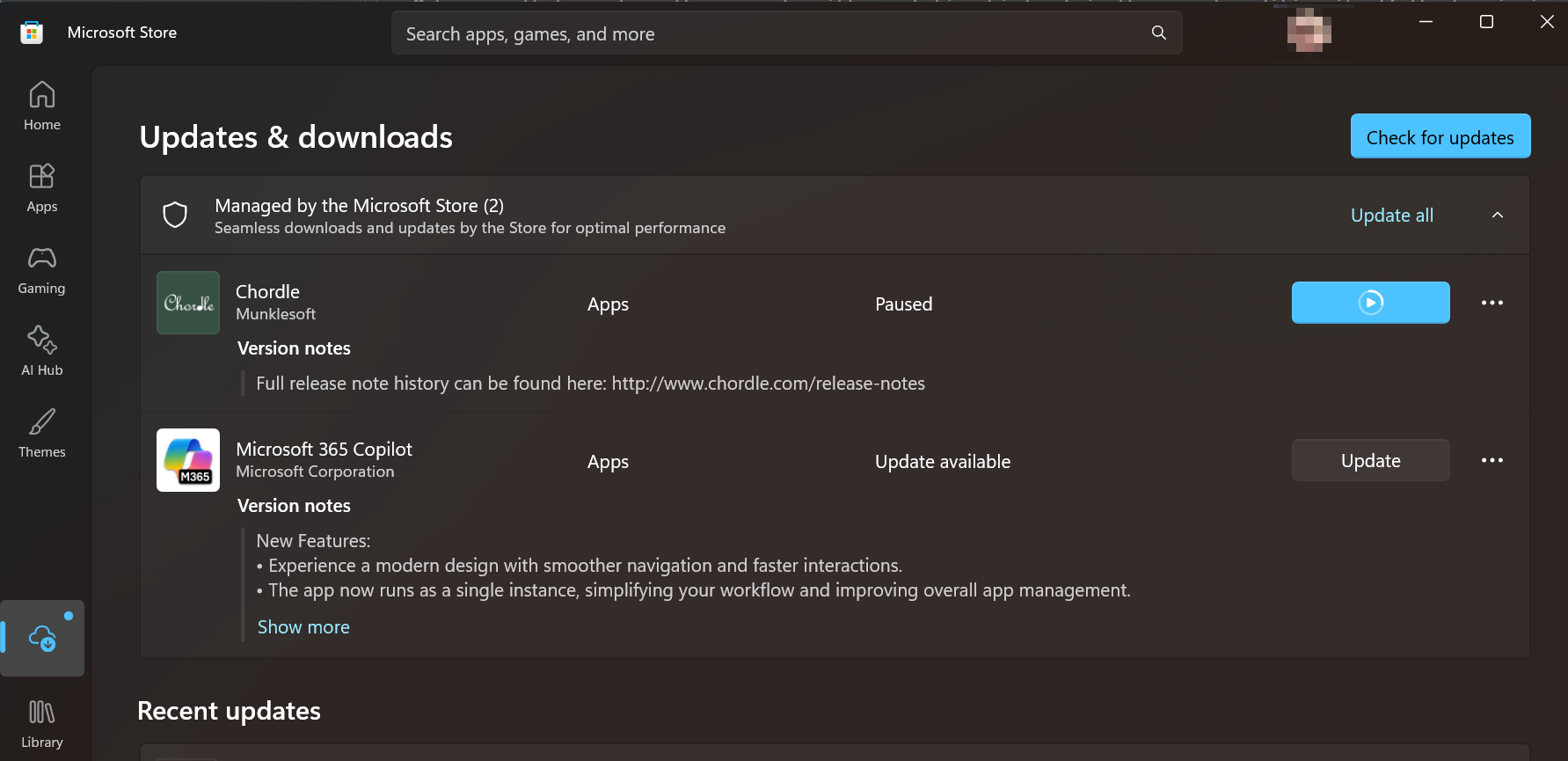
To check for updates, open the Microsoft Store app, and go to the Downloads section. Press Check for updates to see if there are any updates available for Chordle.
Checking for updates on Android (Google Play)
Open the Play Store app, tap your profile icon, then go to Manage apps & device > Updates available. If auto-update is enabled, Chordle will update automatically.
Using other platforms
Which platforms is Chordle available on?
Chordle is available on Windows (via the Microsoft Store) and Android (via Google Play). You can sync your songs and set lists across platforms using Chordle Drive, OneDrive or Google Drive - see cloud syncing.
Can I use Chordle on Linux, ChromeOS or via Wine?
No. Chordle is only available via the Microsoft Store (Windows) and Google Play (Android), and licenses are managed by those stores and are not available in this way.